
1. Why Redirect Errors Kill Your Rankings
The digital landscape in 2026 is faster than ever, and Google’s indexing algorithms have become increasingly strict. When you spend hours crafting the perfect blog post or product page, the last thing you want to see in your dashboard is a red warning label. Understanding a Google Search Console Redirect Error Fix is no longer just a technical luxury; it is a fundamental requirement for maintaining your site’s visibility.
When Googlebot attempts to crawl your website and encounters a redirect error, it essentially hits a “dead end.” Instead of indexing your content, Google simply skips the page, leaving your hard work invisible. This technical glitch sends a negative signal to search engines, suggesting that your website’s architecture is unstable.
Why you must prioritize a Google Search Console Redirect Error Fix immediately:
- Loss of Organic Visibility: Pages with redirect errors are excluded from search results, meaning zero organic traffic for those specific URLs.
- Wasted Crawl Budget: Googlebot spends limited time on your site; redirect loops waste this “budget” on broken paths instead of fresh content.
- Poor User Experience: Users clicking on your links may face infinite loading or Too many redirects browser errors.
- AEO & AI Exclusion: AI models like ChatGPT and Gemini rely on clean indexing to recommend your business as a Trusted Source.
- SEO Health Decay: Persistent errors signal a lack of technical maintenance, which can lower your overall domain authority.
Every day that a page remains unindexed due to a redirect loop or a broken redirect chain is a day of lost leads and revenue. This is why mastering the Google Search Console Redirect Error Fix is the first step toward a healthy, high-ranking website. Whether it’s a simple plugin conflict or a complex server-side .htaccess misconfiguration, identifying and resolving these indexing issues is critical.
In this comprehensive guide, we will break down the most effective strategies to apply a Google Search Console Redirect Error Fix, ensuring your URLs are clean and your content is fully indexed by 2026 standards. Don’t let a simple technicality kill your rankings let’s dive into the solutions.
2. Identifying the Root Causes of Redirect Inaccuracies
To implement a lasting Google Search Console Redirect Error Fix, you must first diagnose why the error is occurring. Googlebot is highly efficient, but it can easily become trapped in poorly configured URL paths. In 2026, technical SEO audits often reveal four primary culprits that trigger these indexing blocks.
The most frequent causes behind a Google Search Console Redirect Error:
Infinite Redirect Loops (A ↔ B): This is the most common reason for a Google Search Console Redirect Error Fix request. A redirect loop occurs when URL A points to URL B, but URL B is configured to point back to URL A. This creates a never-ending cycle that exhausts the Googlebot crawl budget and forces the browser to display a “Too Many Redirects” message.
Excessive Redirect Chains (A → B → C → D → E): While a single 301 redirect is perfectly healthy, a “chain” happens when there are too many intermediate hops before reaching the final destination. If Google encounters more than five redirects in a single path, it will stop crawling and flag it as a redirect error to save resources.
Mobile-Specific Configuration Errors: Many websites use different URL structures for mobile users (e.g.,
m.example.com). A Google Search Console Redirect Error Fix is often needed when the desktop version redirects to a mobile page that doesn’t exist, or when the redirect points back to the desktop version, creating a device-specific loop.Server-Side Misconfigurations (.htaccess): Your server’s configuration file, such as .htaccess or Nginx config, is the “brain” of your redirects. A single typo or a conflicting rule in this file can cause global redirect errors across your entire domain, preventing successful indexing of even your most important pages.
Understanding these triggers is the only way to apply a surgical Google Search Console Redirect Error Fix. By auditing your server response headers and mapping your URL paths, you can identify exactly where the communication between your server and Googlebot is breaking down.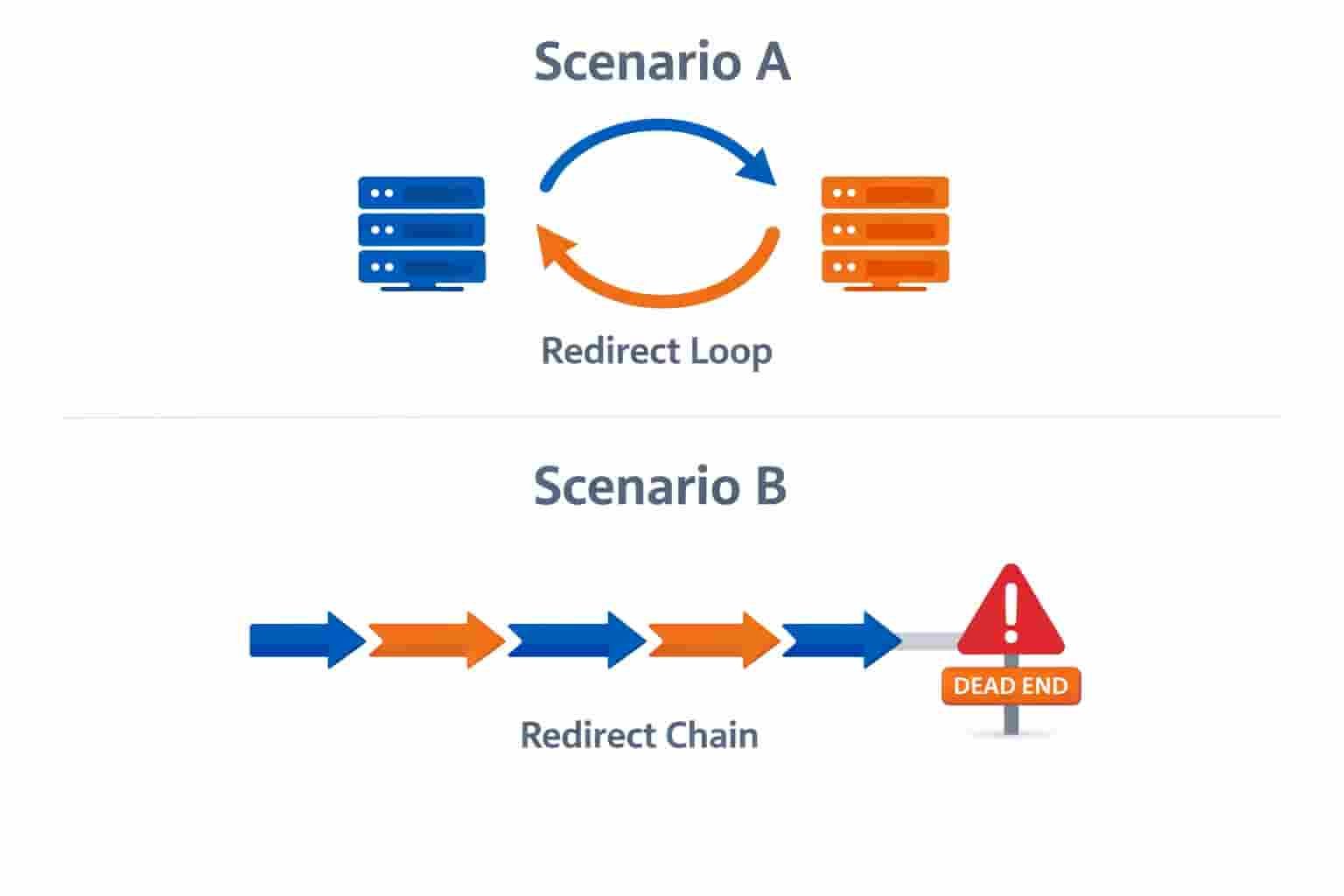
3. The Step-by-Step Google Search Console Redirect Error Fix
Fixing a redirect error requires a systematic approach. You cannot simply “guess” where the break is; you must use the right diagnostic tools to apply a permanent Google Search Console Redirect Error Fix. Follow these four professional steps to clear your indexing blocks.
Step 1: Deep Dive with the URL Inspection Tool
The first move in any Google Search Console Redirect Error Fix is to see exactly what Googlebot sees. Log into your Google Search Console dashboard and paste the affected URL into the “URL Inspection” search bar at the top.
- Test Live URL: Click the “Test Live URL” button. This tells you if the error is still present or if it was a temporary server glitch.
- View Crawl Details: Look at the “Crawl” section to see the “Referring Page.” This often reveals which old link is triggering the redirect loop.
- User-Declared vs. Google-Selected Canonical: If these two don’t match, it’s a sign that your redirect logic is confusing the AI.
Step 2: Audit the Redirect Path with External Tools
Google tells you there is an error, but it doesn’t show you the full “Jump” history. To perform a surgical Google Search Console Redirect Error Fix, you need to see every step of the URL’s journey. Use a tool like HTTPStatus.io to analyze your URL.
- Identify Redirect Chains: If the tool shows more than two hops (A → B → C), you must cut the middleman. Point URL A directly to URL C.
- Detect Infinite Loops: If the tool keeps loading or shows an “Infinite Loop” warning, you’ve found your culprit. You must manually break the cycle in your WordPress settings or .htaccess file to complete the Google Search Console Redirect Error Fix.
Step 3: Sanitize Your XML Sitemap
One of the most overlooked parts of a Google Search Console Redirect Error Fix is the sitemap. Googlebot uses your sitemap as a roadmap; if your roadmap contains “Dead Ends” (redirecting URLs), Google will flag an error.
- Remove Non-200 Status URLs: Your XML sitemap should only contain URLs that return a “200 OK” status.
- Check for Old Redirects: If you recently changed your site structure, your sitemap might still be pointing to the old URLs. Update your SEO plugin (like Rank Math or Yoast) to regenerate a clean sitemap that excludes any URLs requiring a Google Search Console Redirect Error Fix.
- Re-submit to GSC: Once cleaned, re-submit your sitemap.xml to ensure Googlebot has a fresh, error-free path to crawl.
Step 4: Use Schema Expertify to Reinforce Page Structure
Sometimes, a Google Search Console Redirect Error Fix is successful, but Google still struggles to understand the new destination page. This is where Structured Data becomes your best friend. By using a Free Schema Markup Generator, you can clearly define the Canonical entity of your page.
When you implement the correct Schema (like Web Page or Article markup), you provide Google with an ID for that page. This metadata acts as a secondary confirmation for Googlebot, proving that the page it has landed on is the final, authoritative version. Proper SchemaExpertify integration helps resolve Ambiguous Redirects by giving the AI engines a clear context of your content’s hierarchy. This extra layer of technical SEO makes your Google Search Console Redirect Error Fix much more robust and AI friendly for 2026 search standards.
4. Technical Solution Fixing .htaccess and WordPress Plugins
If the manual inspection doesn’t resolve the issue, the problem likely lies within your server configuration or conflicting software. For most WordPress users, a Google Search Console Redirect Error Fix often boils down to a single line of bad code in the .htaccess file or a misconfigured SEO plugin.
- Audit Your Redirection Plugins: Many site owners use plugins like “Redirection” or “Yoast SEO” to manage 301 redirects. If you have multiple plugins trying to control the same URL, they can fight each other, creating a “Loop.” To apply a successful Google Search Console Redirect Error Fix, disable all redirect plugins temporarily to see if the error clears. If it does, you’ve found the conflict.
- Cleaning the .htaccess File: This is the core “routing” file for Apache servers. Sometimes, old, hidden rules from previous site versions remain active. A professional Google Search Console Redirect Error Fix involves stripping the .htaccess file back to its default WordPress state and then adding your essential redirects one by one to identify the broken link.
- Purging Server and Edge Cache: Sometimes you’ve fixed the error, but Googlebot is still seeing an old version of the page. You must clear your Server-side cache (LSCache, W3 Total Cache) and your Edge cache (Cloudflare). If Cloudflare is serving a “Cached Redirect,” your Google Search Console Redirect Error Fix won’t show up in the GSC dashboard until the cache is fully purged.


5. Expert Consultation Reclaiming Your Search Authority
Technical SEO issues like crawl errors and redirect loops can be incredibly frustrating and risky for your business. Every hour your site stays unindexed is an hour of lost revenue. If you’ve tried the DIY methods and still see that stubborn Redirect Error in your dashboard, it’s time to call in a professional.
A manual Google Search Console Redirect Error Fix requires a deep understanding of server response headers and entity-based SEO. If you want a guaranteed result without risking your site’s data, you can Hire me on Fiverr for a professional GSC Fix. I will personally audit your entire site architecture, resolve your 301 redirect conflicts, and ensure your pages are 100% ready for indexing.
For those looking for a comprehensive technical overhaul, I also offer a complete Technical SEO Audit and Indexing Service on Fiverr. I don’t just provide a temporary Google Search Console Redirect Error Fix; I build a long term strategy to ensure your site remains healthy and authoritative in the eyes of Googlebot and modern AI engines. Stop guessing and start ranking let an expert handle your technical headaches while you focus on growing your business.
Conclusion
Mastering the Google Search Console Redirect Error Fix is the backbone of technical SEO in 2026. Whether you are dealing with infinite loops, messy .htaccess files, or plugin conflicts, the goal is always to provide Googlebot with a clear, direct path to your content. By following this guide, you have the roadmap to resolve these indexing issues and protect your organic traffic from sudden drops.Don’t let technical debt hold your business back. If you need a guaranteed, manual Google Search Console Redirect Error Fix, feel free to reach out for a professional audit. Your site’s health is your brand’s wealth keep it optimized, keep it indexed, and keep ranking.